



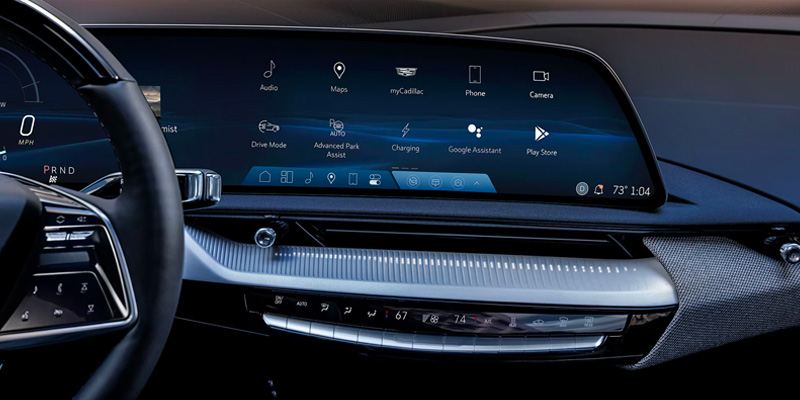
Apple CarPlay® in a Cadillac is one of those things that sounds complicated until you actually use it—then you wonder why every piece of technology can’t be this cooperative. It takes your iPhone, puts it on the center screen, and saves you from fumbling around while driving. Maps, messages, music, calls—right there, big, clear, and mostly behaving itself.
If you’re driving around Huntsville, TX, or heading out for a longer trip, Apple CarPlay® keeps everything you need visible and simple. And yes, it really is as easy as Cadillac says it is.
Setting Up Apple CarPlay® in Your Cadillac
First things first: make sure your iPhone is running the latest iOS version. This solves about 90% of problems before they even start.
Next, connect your iPhone to your Cadillac. Some models use a USB cable, others connect wirelessly. Once connected, your Cadillac’s infotainment system will prompt you to enable Apple CarPlay®. Tap yes, follow the on-screen steps, and just like that, your iPhone interface appears on the center display.
That’s it. No menus buried inside menus. No engineering degree required. Once CarPlay® is active, apps like Maps, Messages, Phone, and Music are ready to use right from the touchscreen.
If something doesn’t connect the first time, it’s usually a settings toggle or permissions prompt on the phone. And if that still feels annoying, help is close by.
Using Apple CarPlay® Day to Day
Cadillac CarPlay® features are built around one simple idea: keep your hands on the wheel and your eyes on the road.
Siri handles voice commands, so you can make calls, reply to messages, and change music without touching the screen. Navigation apps like Apple Maps and supported third-party options display clearly and update in real time, which is especially useful when traffic decides to ruin your plans.
Entertainment is just as straightforward. Music, podcasts, audiobooks, and streaming apps all appear in a clean, familiar layout. Large icons, simple menus, and quick responses mean less distraction and fewer reasons to poke at the screen while driving.
Why Apple CarPlay® Fits Cadillac So Well
Cadillac designs its interiors around technology that feels intuitive instead of overwhelming. Apple CarPlay® fits right into that philosophy. It works alongside other Cadillac tech features like wireless charging, premium audio systems, and driver-assistance technologies without feeling bolted on as an afterthought.
The result is a system that feels integrated, not distracting. Everything is placed where you expect it, responds quickly, and stays out of your way once it’s set up.
Get Help at Wiesner Cadillac
If you want a hands-on walkthrough or need help getting Apple CarPlay® set up properly, the team at Wiesner Cadillac in Huntsville, TX is ready to help. We can walk you through the process, answer questions, and make sure everything is working exactly as it should.
Apple CarPlay® is designed to simplify driving, not complicate it. Once it’s set up, it just works—and that’s the whole point.
.
Connect with us


- 2024 Cadillac Escalade
- 2024 Cadillac Escalade ESV
- 2024 Cadillac Features
- 2024 Cadillac LYRIQ
- 2024 Cadillac XT4
- 2024 Cadillac XT5
- 2024 Cadillac XT6
- 2024 Cadillac XT6 Trim Levels
- 2025 Cadillac Car
- 2025 Cadillac CT4
- 2025 Cadillac CT4-V
- 2025 Cadillac CT4-V Features
- 2025 Cadillac CT5
- 2025 Cadillac CT5-V
- 2025 Cadillac CT5-V Blackwing
- 2025 Cadillac Escalade
- 2025 Cadillac Escalade Features
- 2025 Cadillac Escalade IQ
- 2025 Cadillac Escalade Safety Features
- 2025 Cadillac Escalade Technology
- 2025 Cadillac EV
- 2025 Cadillac Features
- 2025 Cadillac LYRIQ
- 2025 Cadillac Optiq
- 2025 Cadillac Sedan
- 2025 Cadillac SUV
- 2025 Cadillac XT4
- 2025 Cadillac XT5
- 2025 Cadillac XT6
- 2025 Luxury EV SUVs
- 2026 Cadillac CT5 in Huntsville
- 2026 Cadillac Escalade
- 2026 Cadillac Escalade Features
- 2026 Cadillac Escalade IQ Trim Levels
- 2026 Cadillac Escalade Trim Levels
- 2026 Cadillac EVs
- 2026 Cadillac LYRIQ
- 2026 Cadillac LYRIQ vs. 2026 Cadillac VISTIQ
- 2026 Cadillac Phone Technology
- 2026 Cadillac Safety Features
- 2026 Cadillac SUVs
- 2026 Cadillac VISTIQ
- 2026 Cadillac Warranty
- 2026 Cadillac XT5 vs 2026 Cadillac XT4
- 2026 Fuel Efficient Cadillac
- 2026 Fuel Efficient Cadillac Models
- 2026 Luxury EV SUVS
- 2026 Luxury EV SUVS Huntsville
- 2026 Luxury SUVs Electric
- Auto Winterization Huntsville, TX
- Best 2026 Cadillac SUVs for Spring Road Trips
- Best 2026 Luxury SUVs
- Best Hybrid Luxury Vehicles
- Cadillac Advanced Driver Assistance Systems
- Cadillac Blackwing
- Cadillac CT-5 Huntsville, TX
- Cadillac Dealer Huntsville
- Cadillac Dealership Huntsville, TX
- Cadillac Deals College Station, TX
- Cadillac Deals Dallas, TX
- Cadillac Deals Houston, TX
- Cadillac Deals Huntsville, TX
- Cadillac EV Loan College Station, TX
- Cadillac EV Loan Houston, TX
- Cadillac EV Loan Huntsville, TX
- Cadillac Finance Center Huntsville, TX
- Cadillac Finance Huntsville, TX
- Cadillac Fluid Checks Huntsville, TX
- Cadillac Hybrids
- Cadillac Loan Huntsville ,TX
- Cadillac oil change in Huntsville
- Cadillac Tires Huntsville, TX
- Cadillac Warranty Huntsville, TX
- Cadillac Winterization
- Cadillac Winterization Tips
- Cadillac XT5 in Huntsville, TX
- Car Battery Replacement Huntsville, TX
- Car Fluid Levels Huntsville, TX
- Car Loan Huntsville ,TX
- Car Winterization Tips
- Compact Luxury SUV Huntsville, TX
- Compact SUV Huntsville, TX
- Crockett, TX Cadillac Cars
- Dallas Cadillac CT4
- Dallas Cadillac CT4-V
- Dallas Cadillac Dealer
- Dallas Cadillac Escalade IQ
- Dallas Cadillac LYRIQ
- Dallas Cadillac VISTIQ
- Dallas Cadillac XT4
- Dallas Cadillac XT5
- Dallas, TX Cadillac CT-5
- Dallas, TX Cadillac CT4-V
- Dallas, TX Cadillac XT6
- End Of Year Cadillac Deals
- End Of Year Cadillac Specials
- Houston Cadillac LYRIQ
- Houston Cadillac VISTIQ
- How to Set Up and Use Apple CarPlay in Your Cadillac
- How to Set Up and Use Apple CarPlay in Your New Cadillac
- Hunstivile, TX Cadillac CT-5
- Hunstivile, TX Cadillac CT-5-V Blackwing
- Huntsville Cadillac CT4
- Huntsville Cadillac CT4-V
- Huntsville Cadillac Dealer
- Huntsville Cadillac LYRIQ
- Huntsville Cadillac Optiq
- Huntsville Cadillac Service
- Huntsville Cadillac XT4
- Huntsville Cadillac XT5
- Huntsville Luxury Cars
- Huntsville Used Cars
- Huntsville, Cadillac CT-5
- Huntsville, TC Cadillac Maintenance
- Huntsville, TX 2024 Cadillac XT6
- Huntsville, TX Cadillac CT4-V
- Huntsville, TX Cadillac CT5-V
- Huntsville, TX Cadillac Escalade
- Huntsville, TX Cadillac Escalade ESV
- Huntsville, TX Cadillac Escalade IQ
- Huntsville, TX Cadillac Hybrids
- Huntsville, TX Cadillac Maintenance
- Huntsville, TX Cadillac Optiq
- Huntsville, TX Cadillac VISTIQ
- Huntsville, TX Cadillac XT5
- Huntsville, TX Cadillac XT6
- Huntsville, TX luxury 3-row SUV
- Huntsville, TX luxury SUV
- Luxury Car Dealer Huntsville ,TX
- Luxury Cars Huntsville, TX
- Luxury Sedans Huntsville, TX
- Luxury SUVS Huntsville, TX
- New Cadillac CT4
- New Cadillac CT4-V
- New Cadillac CT5
- New Cadillac CT5-V
- New Cadillac CT5-V Blackwing
- New Cadillac Escalade
- New Cadillac Escalade ESV
- New Cadillac Escalade IQ
- New Cadillac Features
- New Cadillac Hybrids
- New Cadillac LYRIQ
- New Cadillac Optiq
- New Cadillac Safety Features
- New Cadillac Technology
- New Cadillac XT4
- New Cadillac XT5
- New Cadillac XT6
- New Year Cadillac Deals
- New Year Cadillac Specials
- Tire Rotation Huntsville, TX
- Uncategorized
- Wiesner Cadillac
- Wiesner Cadillac Finance
- Wiesner Cadillac Huntsville, TX
- Wiesner of Huntsville Service
- Wiper Blades Huntsville, TX
Categories